

Description
Download GPX Viewer – Free, Secure GPX Mapping Tool for Mac
Overview
GPX Viewer is a dedicated desktop application for macOS that lets outdoor enthusiasts, hikers, cyclists, and GIS professionals open, inspect, and analyse GPX files with ease. Developed by William Modesitt, the software lands in the “Geography” category and has been available on Softonic since March 31 2017. Although the program has not yet undergone an independent technical audit, it quickly earned a reputation for being a lightweight, straightforward viewer that focuses on the core needs of GPX data: visualising tracks, way‑points and routes on an interactive map, exporting subsets, and checking file integrity. The current stable release, version 2.96, runs on macOS X and later, supporting the latest Apple silicon and Intel‑based machines. The interface is English‑only, which keeps the learning curve shallow for a global audience that primarily works in the English language. Whether you’re planning a weekend trek, reviewing a recent bike ride, or simply need to confirm that a GPS logger captured the correct coordinates, GPX Viewer offers a free, secure way to open your .gpx files without the bloat of full‑blown GIS suites.
Core Features & Functionality
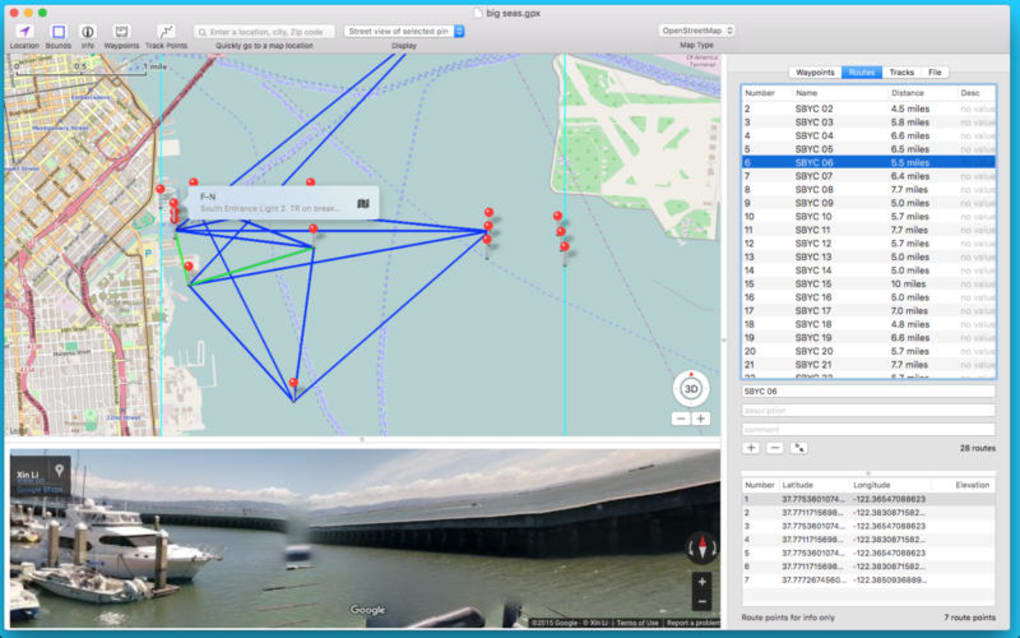
- Map‑Based Visualisation: Load any GPX file and instantly see the track overlay on a high‑resolution map, with zoom and pan controls that feel native to macOS.
- Way‑point & Route Details: Click on individual points to reveal latitude, longitude, elevation, timestamp and custom tags stored in the file.
- Track Editing Tools: Trim, split, or merge tracks directly within the app, then re‑export the edited file without losing metadata.
- Export Options: Save the visualised map as a PNG or PDF for sharing, and export selected way‑points as CSV for spreadsheet analysis.
- File Integrity Check: The built‑in validator scans the GPX structure for missing tags, malformed XML, or duplicate points, helping you catch recording errors early.
- Lightweight Design: The installer is under 30 MB, and the app uses minimal RAM, making it ideal for older MacBooks.
- Automatic Updates: When a new version is released, GPX Viewer notifies you and downloads the update securely via HTTPS.
- Privacy‑First Approach: No telemetry or background data collection; all processing happens locally on your machine.
Installation, Setup & System Compatibility
Installing GPX Viewer on macOS is a straightforward three‑step process. First, download the DMG file from the official Softonic page or directly from the developer’s website. The download size is modest (≈28 MB), and the file is signed with a valid Apple Developer certificate, ensuring that the installer is safe and free from malware. Once the DMG mounts, drag the GPX Viewer icon into the Applications folder. macOS may prompt you to confirm that you trust the application; simply click “Open” to complete the installation.
After installation, launch the app from the Applications folder or via Spotlight. The first run triggers a brief “Welcome” wizard that asks you to select a default map provider (OpenStreetMap is pre‑selected) and set a preferred folder for storing imported GPX files. All preferences are saved in a hidden plist file within your user library, meaning you can move the app between machines without losing settings.
Compatibility: GPX Viewer requires macOS 10.13 (High Sierra) or newer. It runs natively on both Intel‑based Macs and Apple Silicon (M1/M2) thanks to Apple’s Rosetta 2 translation layer when needed. The software does not support Windows, Linux, Android, or iOS, but its file format (.gpx) is universally recognized, so you can generate files on any platform and view them on your Mac.
The user interface follows macOS Human Interface Guidelines, offering a clean toolbar, side panel for file navigation, and a central map canvas. Keyboard shortcuts such as ⌘ O (open), ⌘ S (save), and ⌘ Z (undo) make the workflow faster for power users. If you encounter any issues during installation, the “Help → Troubleshoot” menu provides a step‑by‑step guide for common problems like permission errors or missing map tiles.
Pros & Cons
Advantages
- Free to download and use – no hidden subscription fees.
- Fast loading times even for large GPX files (over 10 MB).
- Intuitive map view with real‑time track rendering.
- Robust file validator that catches GPX schema errors.
- Low system resource consumption; runs smoothly on older Macs.
- Secure update mechanism via HTTPS, with digital signatures.
Drawbacks
- English‑only interface limits accessibility for non‑English speakers.
- No built‑in GPS device integration; files must be imported manually.
- Limited export formats – no KML or GeoJSON support out of the box.
- Absence of advanced GIS analysis tools (e.g., heat maps, elevation profiles).
- Mac‑only; users on Windows or mobile platforms must seek alternatives.
Frequently Asked Questions
Is GPX Viewer truly free, or are there hidden costs?
GPX Viewer is completely free to download and use. There are no hidden subscription fees, in‑app purchases, or advertising banners. Updates are also provided at no cost.
Can I edit GPX files directly within the app?
Yes. GPX Viewer includes basic editing tools such as trimming, splitting, and merging tracks. After making changes, you can save the file back to the original GPX format.
What map sources does GPX Viewer support?
By default, GPX Viewer uses OpenStreetMap tiles, but you can switch to other providers (e.g., Mapbox or Apple Maps) in the preferences panel.
Is there a way to export my track as an image?
Absolutely. The “Export → PNG” and “Export → PDF” options let you save the current map view, complete with track and way‑points, for sharing or printing.
How does GPX Viewer ensure my data remains private?
All processing is performed locally on your Mac. The app does not send any telemetry, usage statistics, or file contents to external servers unless you explicitly use the “Check for Updates” feature, which only contacts the developer’s update server over a secure HTTPS connection.
Conclusion & Call to Action
For macOS users who need a reliable, no‑frills way to open and inspect GPX files, GPX Viewer hits the sweet spot between functionality and simplicity. Its free price tag, lightweight footprint, and focus on core mapping tasks make it a practical choice for hikers, cyclists, and GIS hobbyists alike. While it lacks some advanced analysis features and multilingual support, the core experience—quickly visualising tracks, checking file integrity, and exporting clean images—remains solid and dependable. If you’re looking to replace a cumbersome spreadsheet‑based workflow or need a quick way to verify a newly recorded route, give GPX Viewer a download today. Click the button below to start the secure, free download and begin exploring your GPS data on macOS with confidence.
GPX Viewer delivers a clean, fast experience for Mac users needing to view and lightly edit GPX files. Its free nature and lack of background data collection make it a trustworthy option for privacy‑conscious outdoor enthusiasts. The main trade‑offs are limited export formats and the English‑only UI, but these do not outweigh the benefits for most hobbyists.
- Pros: Free, fast, secure, easy map view, basic editing.
- Cons: English‑only, Mac‑only, no advanced GIS tools.
Guides & Tutorials for GPX Viewer
How to install GPX Viewer
- Click the Preview / Download button above.
- Once redirected, accept the terms and click Install.
- Wait for the GPX Viewer download to finish on your device.
How to use GPX Viewer
This software is primarily used for its core features described above. Open the app after installation to explore its capabilities.
User Reviews for GPX Viewer 0
No reviews found





.webp)